



Japanese language restoration & L hotkey toggle
for all three Shiravune remasters
The case
Every Shiravune remaster of the trilogy still carries its complete Japanese script — all ~93,000 dialogue blocks across Inferno, Purgatorio and Paradiso have their Japanese alongside the English and Chinese. Only the option to display it was removed.
- Japanese as a 4th language in Config → Language Select
- L instant JP⇄EN toggle, mid-scene, backlog included
- A small JP toggle button in the in-game button row
- The story text switches; menus stay English (the releases contain no Japanese menu art)
Try it
Click for the next line. L switches language, exactly like the patch does in game.
“Heya. Figured I'd be seeing you soon, Detective.”
Download
JP restoration patch (Parts I–III)TheShell.pfs.080 · TheShell2.pfs.080 · TheShell3.pfs.080 · + bonus patchesMirrors: pixeldrain
Install
Copy each file into that game's folder, next to its .exe:
TheShell.pfs.080- Part I — Inferno
TheShell2.pfs.080- Part II — Purgatorio
TheShell3.pfs.080- Part III — Paradiso
Install any or all; the games are independent. Uninstall by deleting the file — saves are unaffected. Built and tested on the GOG releases; Steam and JAST versions should be compatible.
Bonus: dark mode backlog
An optional extra, independent of the Japanese patch. It turns the backlog from black text on a light page into white text on a dark page, and recolors the scroll buttons to match.
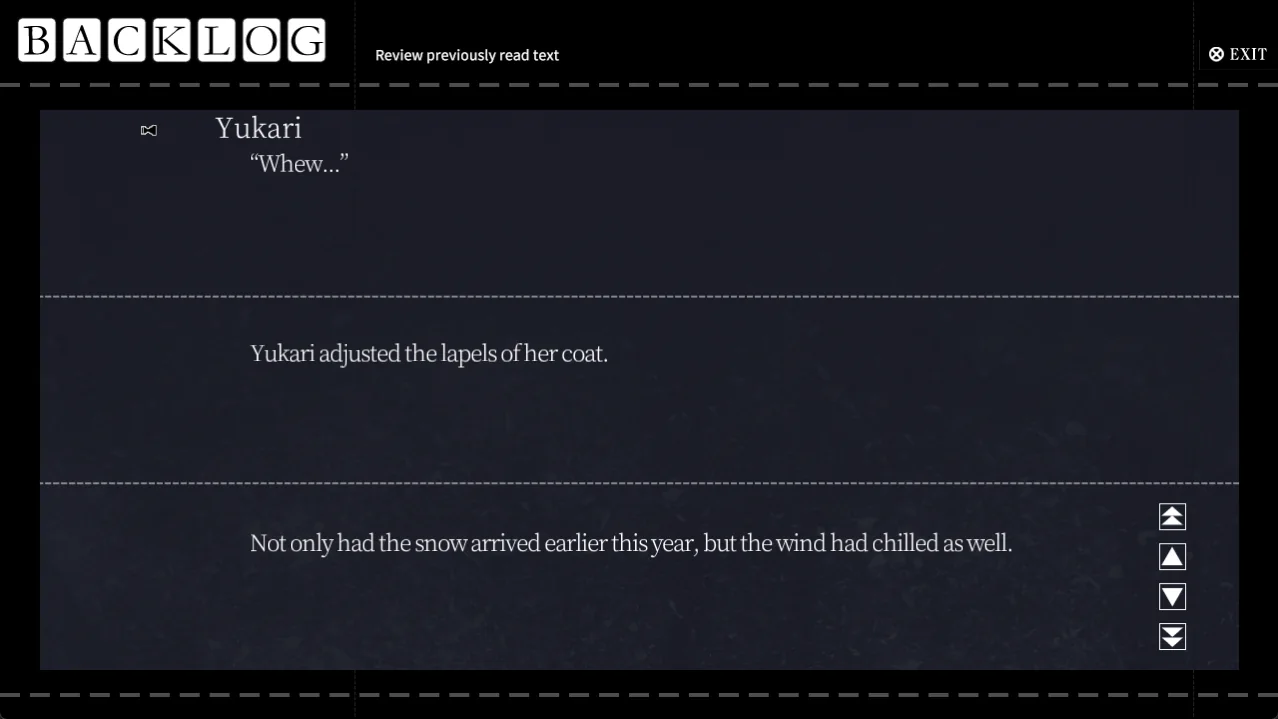 Dark mode backlog (optional, Parts I–III)TheShell.pfs.085 · TheShell2.pfs.085 · TheShell3.pfs.085
Mirrors:pixeldrain
Drop each game's .pfs.085 into its folder, next to the .exe. Delete it to go back to the original look. Saves are not affected.
Bonus: voice keep
An optional extra, independent of the Japanese patch. It stops voice lines from being cut off by menu actions, so a line keeps playing while you open the backlog, hide the UI or save.
Voice keep (optional, Parts I–III)TheShell.pfs.081 · TheShell2.pfs.081 · TheShell3.pfs.081Drop each game's .pfs.081 into its folder, next to the .exe.